Here is an amazing section that will help you to show a Product on the Homepage. You can show all information of the product in this section and customers also can add the product to Cart in this section.

Steps: In the theme editor (Customize) > Add section > Featured Product > Save.
You can choose a product to show in this section and change the featured image.
Enable sticky product information on large screens
Enable center product information

You can config Media layout, Media size, Thumbnail left/right size, Media ratio, Media position.
Config Image action, Zoom type, enable zoom, wishlist, compare buttons
Enable video looping, muting, autoplaying (if you have a video for product media)
Slider effect: Fade or Slide
Prev next buttons: enable them and change Visible, Button style, Button color, Button size, etc...
Page dots: enable and change some styles

Please follow this guideline to config Layout, Background, Margin/Padding for the section.

Go to Featured product > Add block > choose block you want to add here. You can add many blocks in Featured product section as a Product Main.
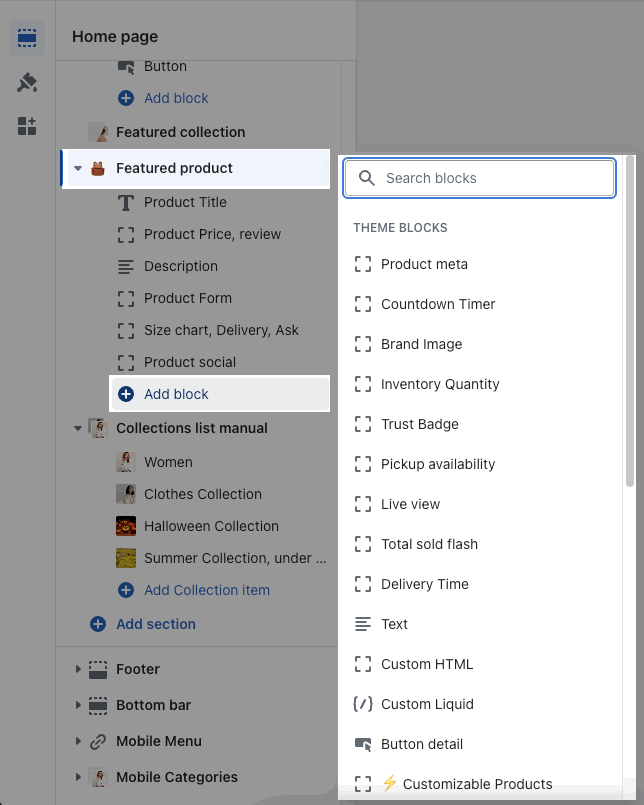
You can check the guideline for these blocks in Product Page, it is the same as Featured product.